
Dynific Dynamic Tags
Dynamic Tags let you bind any text, image, or link field in Elementor to live data — the current post’s title, an ACF field, a WooCommerce product’s price — instead of typing static content. Set it up once on a template, and it displays correctly for every post, product, or term the template is used on.

The Three Tag Groups
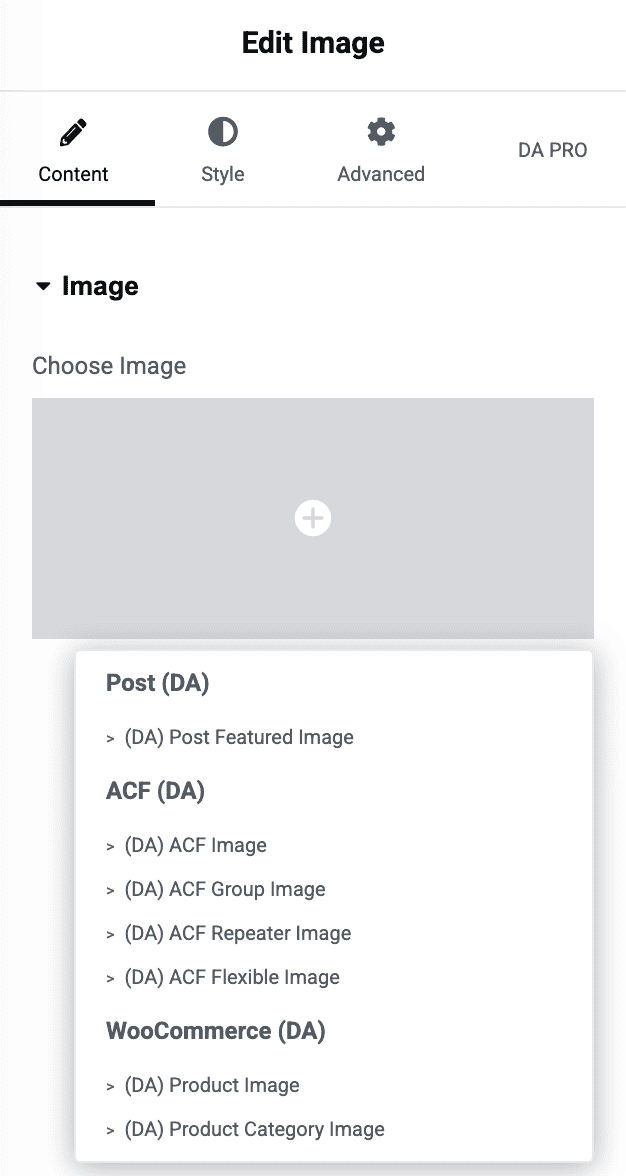
Dynific adds three dynamic tag groups to Elementor’s tag picker, each covering a different data source:
| Group | Covers | Requires |
|---|---|---|
| Post (DA) | Built-in WordPress post data — title, featured image, excerpt, date, custom field, term, URL, gallery. | Nothing extra — always available. |
| ACF (DA) | Advanced Custom Fields values — plain fields, fields inside an ACF Group, ACF Repeater rows, ACF Flexible Content layouts, and ACF Options Page fields (labelled Option: in the field picker). | ACF or ACF Pro active. |
| WooCommerce (DA) | Product data — price, sale price, SKU, stock, rating, short description, category, product images. | WooCommerce active. |
Each group is prefixed “(DA)” in the picker, and every individual tag title is too (e.g. “(DA) Post Title”) — that’s just branding so you can tell these apart from native Elementor tags or other plugins’ tags in the same list.
Deeper docs for each group — Post Dynamic Tags, ACF Dynamic Tags, ACF Repeater Dynamic Tags, ACF Flexible Content Dynamic Tags, and ACF Options Page Dynamic Data — cover their individual tags in full; this page is the overview.
Using a Dynamic Tag
This is plain Elementor UI — nothing plugin-specific to learn:
- Click the small dynamic-content icon next to any control that supports it (most text fields, images, and links).
- Pick a tag from one of the (DA) groups.
- If the tag has its own settings (e.g. a date format, an image size, a fallback), they appear inline right below it.
Fallback Content
Most tags include a Fallback control for when the underlying data is empty — e.g. a fallback image if the post has no featured image, or fallback text if an ACF field or URL is blank. This is set per-tag, right in the picker.
For richer control, the ACF Fields V2 widget adds a full Fallback Content section per field — letting you show fallback text, a fallback image, or even an entire saved Elementor template when a field is empty, with a toggle to preview that fallback while editing.
Where You Can Use Them
Dynamic tags aren’t limited to Dynific’s own widgets. Since they register through Elementor’s standard dynamic tag system, they’re available on any control — in any widget, from any plugin, or in Elementor’s Theme Builder — that supports the matching content type (text, URL, image, etc.).