
DA – Woo Tabs
The DA – Woo Tabs widget lets you display WooCommerce product details like Description, Additional Information, and Reviews in a clean, organized tab layout. You can also add Custom Tabs to show extra content such as shipping info, return policy, or any other custom details.
This widget features the following controls.
Content
General
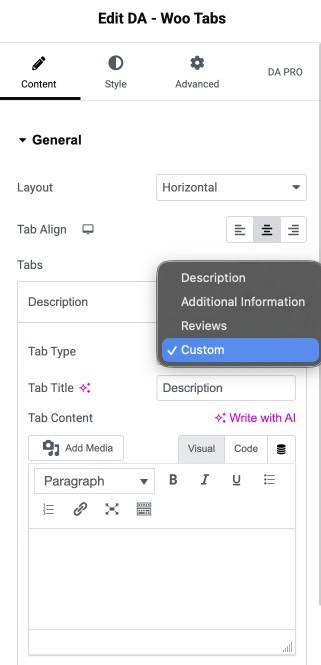
- Layout: Choose layout from vertical or horizontal.
- Tab Align: Select the alignment to display the tab.
- Tabs
- Tab Type: Choose the type of tab such as Description, Additional Information, Reviews, or Custom.
- Tab Title: Set the title text that will appear on the tab.
- Tab Content: Add and customize the content displayed inside the tab(applicable for custom tab type)
Style
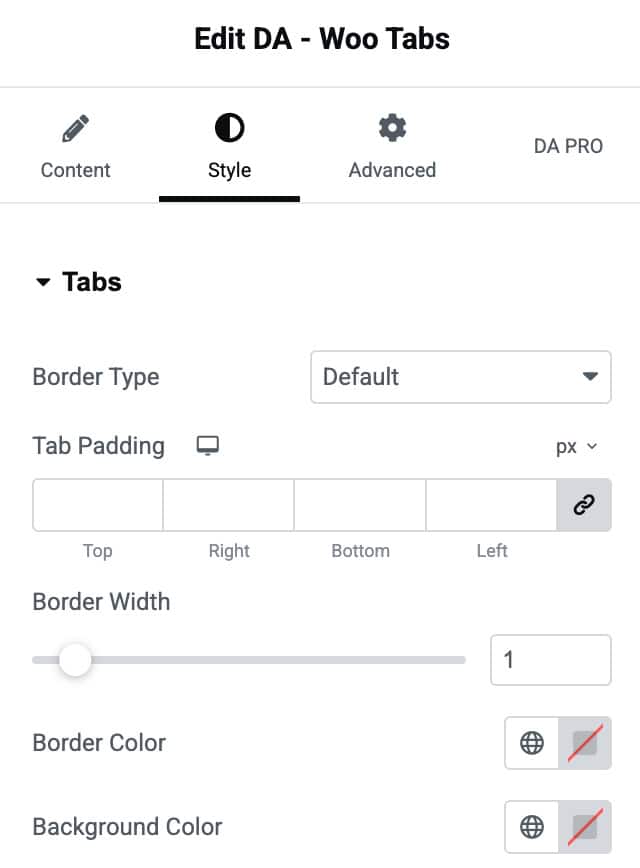
Tabs
- Border Type: Choose the border type.
- Tab Padding: Set the padding.
- Border Width: Specify the border width.
- Border Color: Choose the border color.
- Background Color: Select the background color of tab.
Title
- Color: Choose the color of title.
- Active Color: Select the title color when it is in active mode.
- Typography: Set the typography.

Content
- Color: Select the color of tab content.
- Typography: Set the typography.
