
ACF Flexible Content Dynamic Tags
The ACF Flexible Content Dynamic tags pull values from a specific layout inside an ACF Flexible Content field. They require ACF Pro and are designed for use inside a Block Layout bound to that field via the ACF Flexible Content widget — see Understanding Block Layouts.
The Field Picker
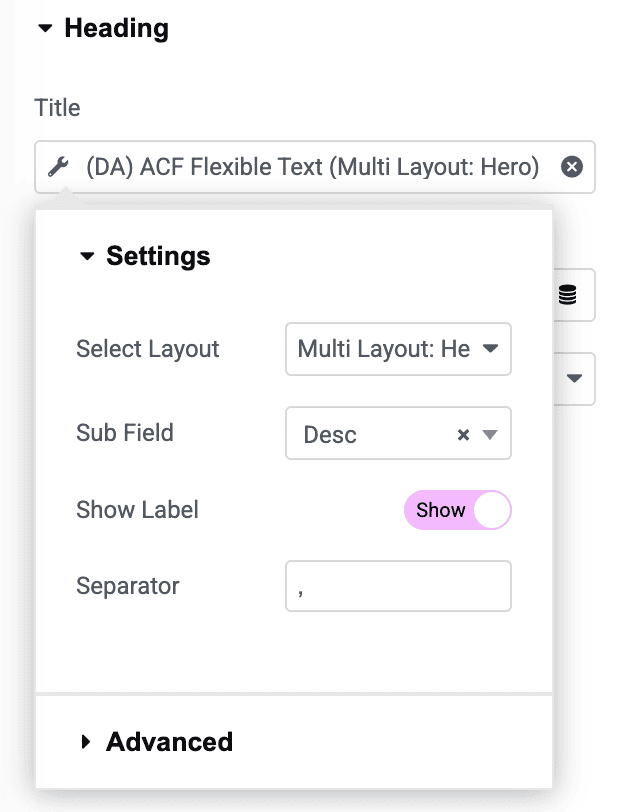
Because a Flexible Content field can have several different layouts (each with its own set of sub-fields), the picker has two steps:
- Select Layout: Choose which flexible-content layout to pull from.
- A Sub Field dropdown then appears, scoped to that layout’s sub-fields of the matching type — pick the specific one.
Tip: Since each row in a Flexible Content field can use a different layout, design one Block Layout per flexible-content layout — the ACF Flexible Content widget automatically matches each row to the right one.
The Tags
ACF Flexible Text
Outputs a text-type sub-field: Text, Textarea, Number, Email, Password, WYSIWYG, URL, Select, Checkbox, Radio, True/False, oEmbed, Google Map, Date/Time Picker, or Color Picker.
- Select Layout / Sub Field selector.
- Show Label: For Select/Checkbox/Radio fields, show the human-readable label(s) instead of raw stored value(s).
- Separator: Text used between multiple selected values.
ACF Flexible Number
A lighter version scoped to Text and Number sub-fields, with a numeric fallback of 0 when empty.
- Select Layout / Sub Field selector.
ACF Flexible Image
Outputs an Image, File, or URL sub-field as an Elementor image.
- Select Layout / Sub Field selector.
- Fallback: An image to use when the sub-field is empty.
ACF Flexible URL
Outputs a URL, Image, File, Text, Email, Relationship, Link, Page Link, Post Object, or Taxonomy sub-field as a link-ready URL — with the same per-type handling as ACF URL (Email → mailto:, Post Object/Relationship → permalink, Taxonomy → term link).
- Select Layout / Sub Field selector.
- Fallback: Text/URL to use when empty. Defaults to
#.
ACF Flexible Gallery
Outputs a Gallery sub-field as an Elementor gallery.
- Select Layout / Sub Field selector (Gallery fields only).