How to Make Container Clickable in Elementor
If you want an entire Container in Elementor to work as a clickable link just like a button, it can be done easily using the DA – Dynamic Link feature. This helps improve UX and makes designs more responsive, especially for blog cards, service boxes, and product layouts.
Step-by-Step: Make a Container Clickable
Open Container Settings
- Edit the page with Elementor
- Select the Container you want to make clickable.
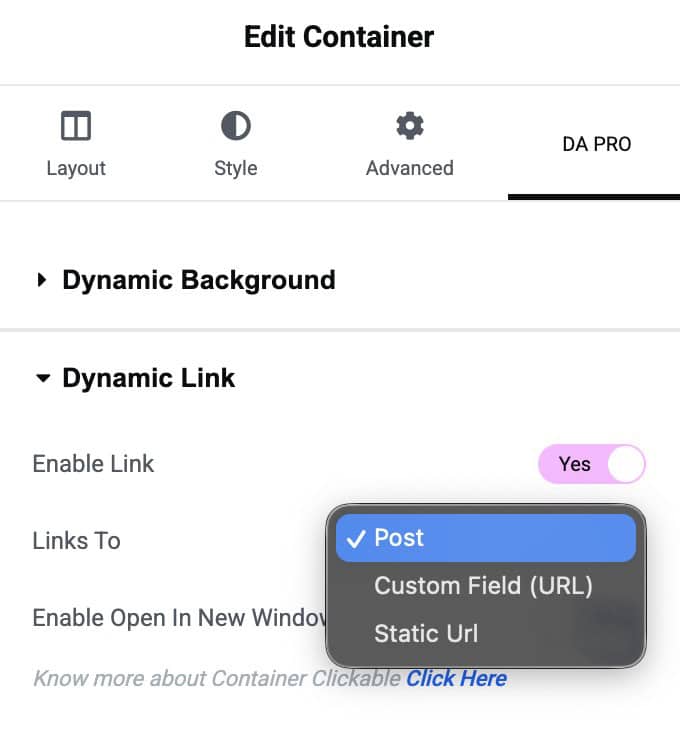
- In Container settings, go to DAPro tab.
- Then, navigate to Dynamic Link Settings and enable it.
Choose How You Want to Assign the Link
The plugin provides 3 link options based on your use case:
- Post Link
- Best when creating block layouts for Post Block widgets
- Clicking the container will redirect users to the selected post permalink
- Custom Field Url
- Use when you store links in a custom field
- Clicking the container will open the URL saved in that custom field
- Great for dynamic URLs like external sites, affiliate offers, or product pages
- Static Url
- Enter any fixed URL manually
- Ideal for banners or CTA sections that always redirect to a specific page