
Using DA – Pods Checkbox Field in Dynific Addons for Elementor
To display data from the Pods Checkbox Field, you will have to use the DA – Pods widget.
You can display data from single select as well as multi-select fields.
Prerequisite
Make sure that the Return Format of the Pods Checkbox field is set to Value in Pods Backend field settings.

Widget Settings
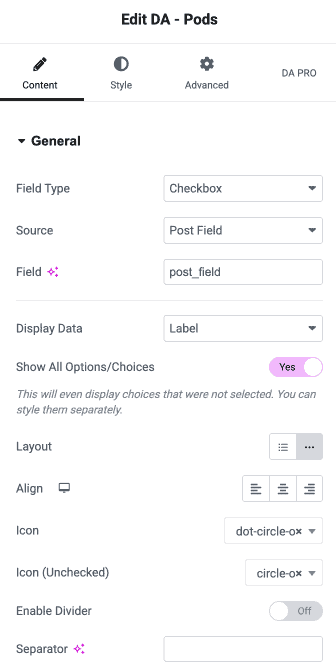
- Field Type: To display the data from Pods Checkbox Field, it should be set to Checkbox.
- Source: Select from where you want to fetch the data.
- Post Field: Retrieve data from the Post Fields. (To be used in Post/CPT singular template. It can also be used in designing loop – in Block Layouts for Post Block widget.)
- Term Field: Displays data from Term Fields (To be used on Taxonomy Archive Templates)
- User: Select this to display data from User meta fields. (To be used on Author Archive Templates)
- Option: Use this to display data from Settings pages created using Pods.
- Field: Field name/slug.
- Display Data: Choose where you want to display Key or Label for the selected options.
- Show All Options/Choices: Enable this to display all the options along with the selected option(s). Unselected options will be displayed as strike-out text by default. You can alter this by changing its style from dedicated options given under the Styles tab.
- Layout: Choose Vertical (list) or Horizontal layout.
- Align: Give alignment to the content like left, center, and right.
- Icon: Icon to be displayed before the Checked/Selected option.
- Icon (Unchecked): Icon to be displayed before the Unchecked/Non Selected option.
- Divider: Enable divider line in between multiple items. You will get more styling options for divider under Style Tab.
- Separator: Instead of standard divider lines, you can also place your own separator like a comma, slash, etc. Just type the required separator.
Sample Layouts
