Background Slider
This is not exactly a separate widget but a utility feature.
With this feature, you can add background sliders to Containers. This will be just like placing a background image or video. So you can keep adding any other widgets inside your Container.
To add a Background Slider to your Container, go to Container settings.
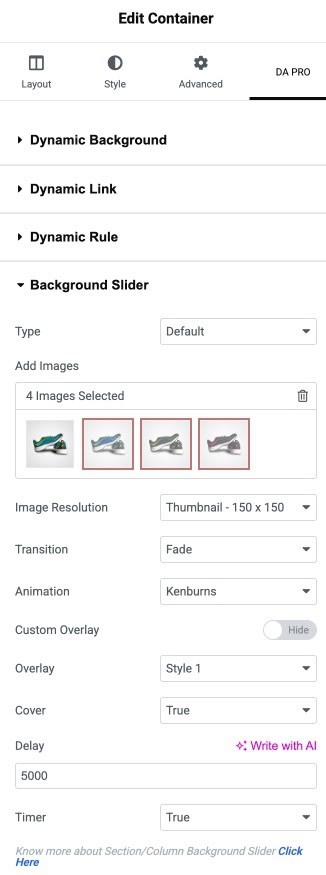
- Go to DA Pro -> Background Slider.
- Type: Choose the type from default or ACF gallery.
- Source: Select source to display data (applicable when you choose ACF Gallery as Type).
- Custom Field Name: Choose the ACF field name (applicable when you choose ACF Gallery as Type).
- Add Images: Click on “+ Add Images” to add images to the slider.
- Image Resolution: Select Image Size
- Initial Slide: Set some other slides as the initial slide. Defaults to 0 for the first slide
- Transition: Choose slide transition
- Animation: Choose the Kenburns animation style
- Custom Overlay: Add custom overlay over slides. You can set color, image, or gradient as an overlay.
- Overlay: Choose from predefined overlay images.
- Cover: Specify whether the image should cover the complete slider.
- Delay: Delay between each slide.
- Timer: Enable/Disable the progress bar at the bottom of the slider.