
DA – Post Read More
The Post Read More widget can be used on Archive Layouts. It adds a read more button that will redirect the visitor to the Post Single (Detail) link.
Content
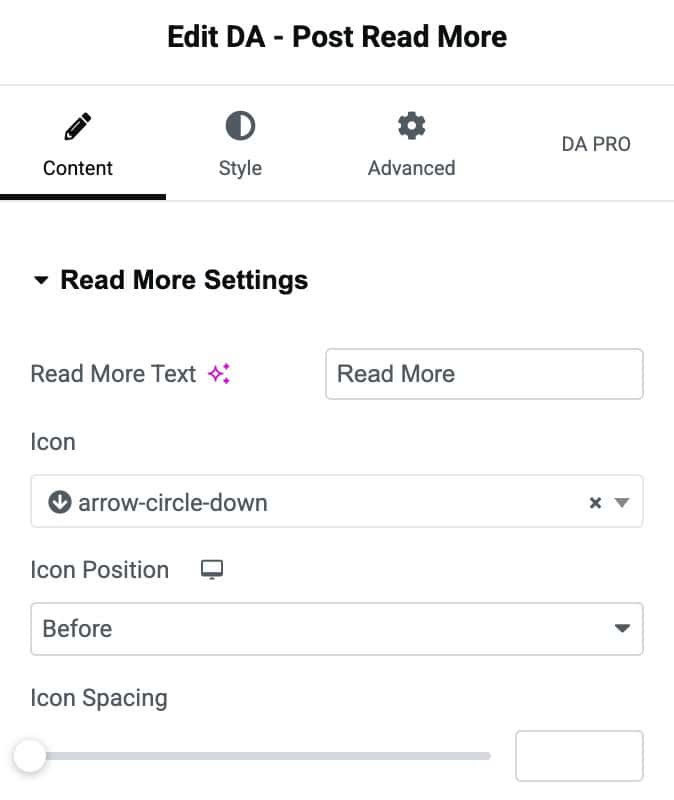
Read More Settings
- Read More Text: Give text to the readmore button. The default is Read Mode
- Icon: You can select an icon from here.
- Icon Position: Choose where you want to display the icon inside the button.
- Icon Spacing: Adjust the spacing between Icon and Button Text here.
Style
Read More
- Align: Set the horizontal alignment of the Read More button.
- Typography: Customize the font style, size, and weight for the Read More text.
Normal/Hover
- Color: Set the text color for the Read More button.
- Icon Color: Choose the color of the accompanying icon.
- Icon Size: Adjust the icon size using the slider.
- Background Color: Set the background color for the button.
- Border Type: Select the border style.
- Border Radius: Set the border radius.
- Padding: Add inner spacing to adjust button sizing.
- Margin: Add outer spacing around the button for proper placement.
