Display Related Posts using Post Blocks Widget
Now, you can use the DA – Post Blocks Adv widget to display the Related Posts section on Single Post Layouts.
It works by fetching posts from the same terms (like categories and tags) as of the current post. You will have full content where to match either categories, tags, or both. You can also choose custom taxonomies if you have any.
NOTE: This functionality will only work on Single Post layout.
Steps to Display the Related Posts in Elementor
Follow the steps below to show the Related Posts on your website.
Step 1: Add Post Blocks Adv Widget
- Drag the “DA – Post Block Adv” widget at the desired location in your Dynific Addon Single Post Template.
Step 2: Configure the Layout
- Under the Layout section, select the layout style to display the posts like Grid, Carousel, or Accordion.
- Then, select the block layout that you have created. Learn more about creating a block layout. Set other parameters for the layout style.
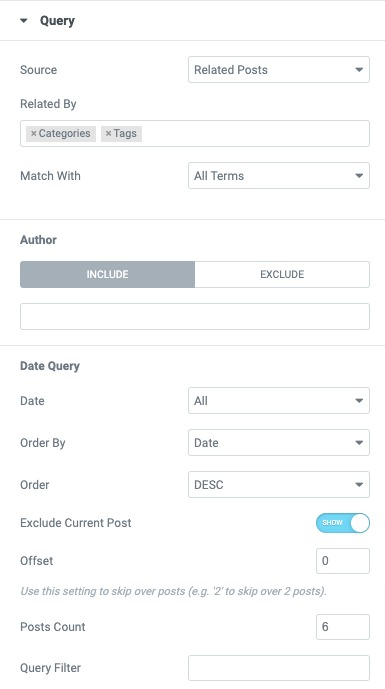
Step 3: Configure Query to Fetch Related Posts
- Do the following configuration under the Query section.
- Source: Related Posts
- Related By: Select the taxonomies that you want to match to load related posts. Select “Categories” if you want to show posts with the same categories as current posts. You can also select multiple taxonomies.
- Match With: Set if the filter parameters should match with All the Term or Any One Term.
- Author: You can Include and Exclude posts created by the Author’s name.
- You can also set the filters based on the Date.
Once configured, your Single Post page will automatically show related posts based on taxonomies selected in the query configuration, improving user navigation and experience.